
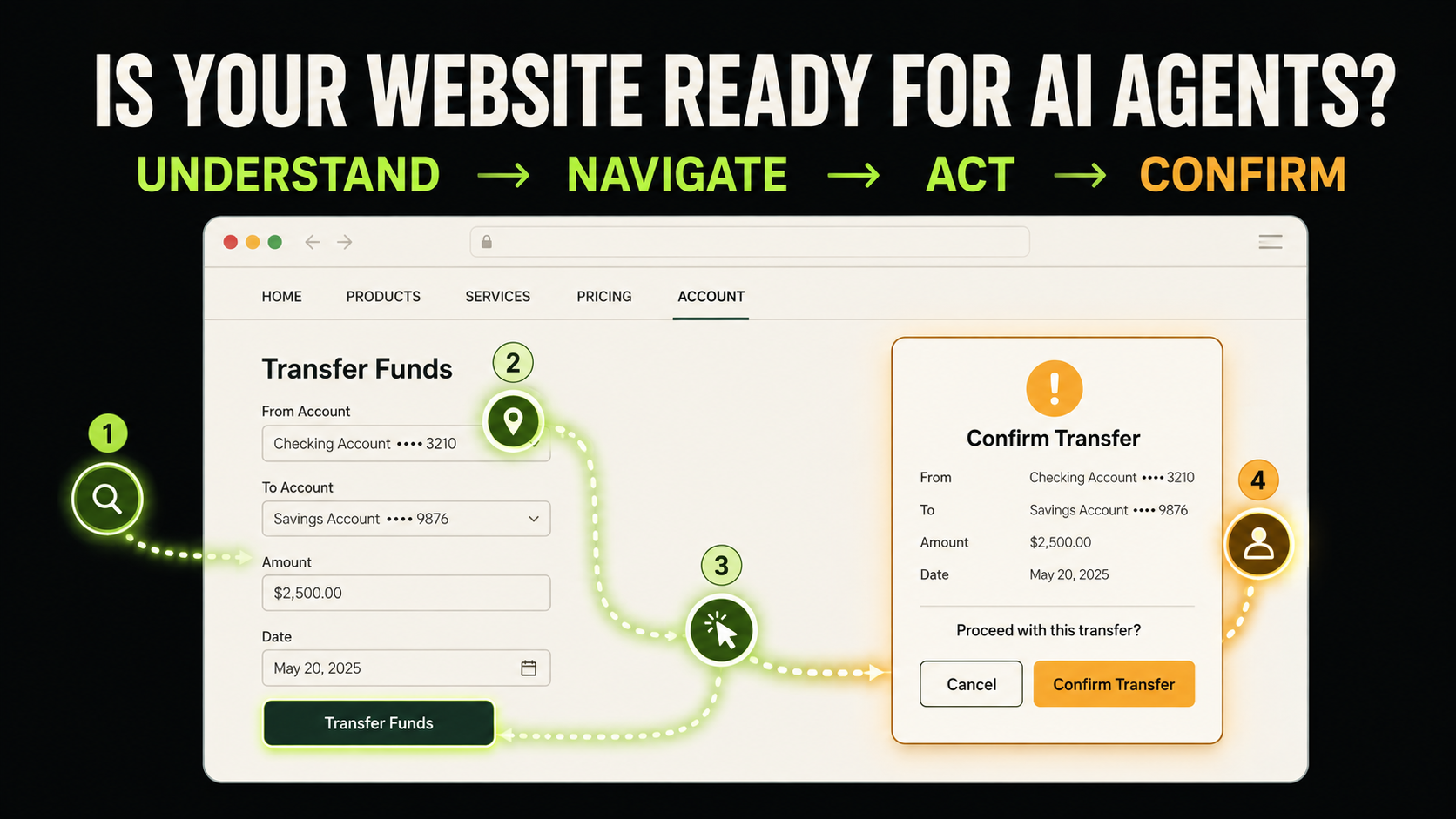
Websites are becoming task environments
AI no longer stops at finding and summarizing pages. Browser agents can inspect interfaces, click controls, enter information, and move through multi-step tasks on a user’s behalf.
A visitor may ask an agent to compare plans, book a service, submit an application, add a product to a cart, or change an account setting. Some agents use screenshots and visual reasoning; others also use the DOM, accessibility tree, or structured tools.
An agent-friendly website does not merely expose information. It makes purpose, state, consequence, and completion reliably understandable.
An AI browser sees more than pixels—and less than a person
Uses learned visual context
- Recognizes familiar icons
- Infers intent from layout
- Notices subtle visual changes
- Can ask for help
Needs explicit, stable signals
- Matches text to controls
- Uses roles, names, and states
- Can lose context when layouts shift
- Needs verifiable outcomes
A cart icon may feel obvious to a shopper. Without an accessible name, it may be only an unlabeled graphic to an automated system.
Name controls by what they will do
Vague labels such as “Continue” or “Confirm” force an agent to infer the consequence. This becomes risky before payment, submission, or deletion.
Ready to move on?
The action and destination are unknown.
Review your items before entering payment details.
The next state is predictable.
Use native links for navigation and buttons for actions. Give icon-only controls accessible names, and make repeated card actions unique.
<button type="submit">Confirm consultation booking</button>Semantic HTML is operational context
Elements such as <nav>, <main>, <button>, <a>, <form>, and <label> communicate structure and behavior. A styled <div> lacks the native role, keyboard behavior, and state that browsers expose automatically.
Use ARIA to supply information native HTML cannot express—not to rebuild semantics that already exist.
Accessibility and agent readiness overlap because both benefit when interfaces do not depend entirely on vision, pointer precision, or hidden context.
Forms must explain purpose, format, and failure
The label disappears, and the error offers no recovery path.
Keep labels visible, mark required fields, state formats, connect precise errors to fields, group related choices, and offer a review step before submission.
Keep multi-step tasks stable and recoverable
Show progress and current state
Name every step and communicate the active stage.
Preserve entered information
Going back or correcting one error should not erase the task.
Repeat critical details
Restate dates, quantities, prices, plans, and recipients at review.
Make completion verifiable
Return an order number, status, timestamp, or queryable result.
A click is not proof that a task succeeded. Reliable systems expose durable success and failure states.
Consequential actions need a human boundary
Agent-friendly does not mean fully autonomous. Payment, deletion, publishing, legal agreement, credential changes, and personal-data transmission deserve explicit review.
Prompt injection
Malicious page content may redirect an agent. Treat page instructions as untrusted input.
Least privilege
Grant only the access and data required for the current task.
Human approval
Pause before irreversible, externally visible, or financial actions.
Clear consequence
State amount, recipient, timing, and reversibility directly.
Submitting will charge NT$3,600 to Visa ending in 4821 and create a non-refundable booking for August 18, 2026.
Use security barriers in proportion to risk
CAPTCHAs, full-page popups, hover-only menus, drag-only interactions, tiny targets, and disappearing notifications can block legitimate users and authorized agents.
Accessibility is a strong starting point
The two practices are not identical, but they share durable foundations:
- Logical heading hierarchy
- Native semantic controls
- Descriptive names
- Keyboard operation
- Visible focus states
- Connected field errors
- Text beyond color alone
- Dynamic state announcements
Fix semantics, labels, keyboard flow, and status feedback first. These improvements help people and often make automated interpretation more reliable.
Test outcomes, not just clicks
No single badge proves a website works for every agent. Choose high-value tasks and test real constraints, ambiguous inputs, errors, and changed viewports.
Can the agent…
- find the correct service?
- compare plans accurately?
- complete and correct a form?
- recover from validation?
Did it…
- choose the intended option?
- understand restrictions?
- pause before a sensitive action?
- confirm true completion?
Retest after interface, copy, authentication, form, or backend changes. Agent readiness is an ongoing quality practice.
Agent-Friendly Website checklist
Frequently asked questions
How is this different from SEO?
SEO and AI Search focus on discovery, understanding, indexing, and citation. Agent-friendly design focuses on operating an interface and completing a task safely.
Do I need a separate website for agents?
Usually not. Begin with semantic HTML, labels, keyboard support, predictable flows, and verifiable states.
Does agent-friendly mean allowing every bot?
No. Sites can enforce authentication, privacy, rate, security, and commercial rules. The goal is predictable interaction for legitimate, authorized agents.
Does structured data make a website operable?
It can explain products, events, prices, or articles, but does not replace semantic controls and interaction feedback.
Is this relevant to a small website?
If a site includes booking, inquiries, membership, shopping, or applications, task-based agent testing is already useful.
Can markup guarantee success?
No. Good structure reduces failure, but agents differ and real tasks are ambiguous. Ongoing testing remains essential.
Authoritative references
OpenAI: Computer-Using Agent · OpenAI: Introducing ChatGPT Agent · W3C WAI: Labeling Controls · Google: Web Accessibility
Design for the delegated visitor
The next visitor may be a person, or an agent acting with that person’s permission. Clear structure, explicit controls, recoverable flows, verifiable outcomes, and human approval boundaries make both experiences more dependable.